What it is, and what a spare actually unlocks
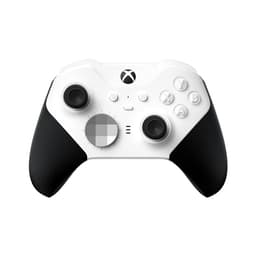
This is the current official Xbox controller: wireless, textured grips, a hybrid direction pad, a dedicated share button for capturing clips, and a 3.5 mm socket on the bottom that any ordinary headphones or gaming headset can plug into. It runs on two AA batteries out of the box — more on that below, because it’s the one genuinely divisive thing about it — and it pairs with a Windows PC and Android phones as well as an Xbox console.
The useful way to think about a second controller is that you aren’t buying a controller, you’re buying a second seat. An Xbox with one pad is a solitary machine. An Xbox with two is a thing a couple can do on a Friday night, or a way for a parent to sit down with a child rather than watch them. That’s a much better gift than the object itself suggests, and it’s the argument we’d make if you’re wondering whether a controller is too boring a present.
The other real use is replacement. Controllers are the part of a console that wears out: thumbsticks drift, bumpers get mushy, and people put up with it for months because replacing one feels like an admin task rather than a treat. Giving someone a fresh pad solves a problem they’ve been quietly tolerating.
The trap: Xbox and PlayStation controllers are not interchangeable
This is the single most common gaming-gift mistake and it is worth stating plainly: an Xbox controller does not work on a PlayStation, and a PlayStation DualSense does not work on an Xbox. They look broadly similar in a product photo, both say “wireless controller”, and neither box shouts loudly enough about it.
Confirming which one they own takes seconds if you’ve ever been in the room: an Xbox pad has its two thumbsticks at different heights and a big X in the middle; a PlayStation DualSense is symmetrical, usually white, with a light strip around the touchpad. If you can’t check at all, don’t guess — our Xbox pad vs DualSense comparison covers how to identify each one, and a gift card sidesteps the issue completely.
The AA battery question
Unlike PlayStation and Nintendo pads, the Xbox controller still ships running on two AA batteries rather than a built-in rechargeable one. Opinion is genuinely split on this: some owners like being able to swap in fresh cells mid-session with no downtime, others find it an irritating throwback.
As a gift buyer you should simply know that a bare controller will need batteries on the day, and that a rechargeable battery pack is sold separately. If you want the gift to work the moment it’s unwrapped — and on a birthday morning you really do — add a pack of AAs or a charging kit. It’s a small thing that makes a large difference to how the present lands.
Who it suits
Any Xbox household with one controller. The clearest case. You are buying them the ability to play with somebody.
A PC gamer. The Xbox pad is the de-facto standard controller on Windows — most PC games that support a controller assume this one, which makes it the least fiddly option by a distance. It’s a good gift for a PC player even if they’ve never owned an Xbox. Our guide to controllers on a PC covers the one catch: over Bluetooth on a PC, Microsoft says rumble and a plugged-in headset don’t work, so a USB-C cable is worth adding.
Someone whose current pad is drifting. If you’ve heard them complain that their character “walks on its own”, that’s stick drift, and this is the fix.
Who should get something else
A household that already has two or three pads and only ever plays solo games doesn’t need another. A competitive player who spends hours a day on shooters might genuinely prefer the Elite Series 2, which adds adjustable trigger stops and tunable stick tension — it’s three times the price and only makes sense for someone who would notice. And if you can’t confirm the console, buy nothing that plugs in.
Is it worth it as a present?
Yes, with the caveat that it’s a practical gift rather than an exciting one. It will get used more than almost anything else you could buy at this price, and it will still be in service in three years. If you want it to feel more like an occasion, pair it with a game or a Game Pass code so there’s something to play the moment the batteries go in.