Xbox Controller vs PlayStation DualSense: Which One Do They Need?
This is not a question of which controller is better. It's a question of which console is in their house — because these two do not work on each other's machines, and that's the most common gaming gift mistake there is.
The short answer: Buy the one that matches their console — an Xbox controller for an Xbox, a DualSense for a PlayStation 5. They are not interchangeable and no adapter makes them properly so. If you can identify the controller they already own, you have your answer: the Xbox pad has offset thumbsticks and a large X button in the middle; the DualSense is symmetrical, usually white, with a light strip around its touchpad. If you cannot find out, buy a gift card instead.
Every December, a large number of perfectly good controllers get returned unopened, because they were bought for the wrong console. It’s nobody’s fault: in a product photo these two objects look like variations on the same theme, both boxes say “wireless controller”, and neither shouts loudly enough that they are entirely incompatible with each other’s hardware.
So this page is less a comparison than an identification guide. Once you know which console they own, the decision is made for you — and if you truly can’t find out, there’s a right answer for that too.
How this is funded: Player Two Co earns a commission if you buy through our links, at no extra cost to you. It never changes which gift we recommend, and we’ll tell you when we’d skip one. Full disclosure.
Choose in ten seconds
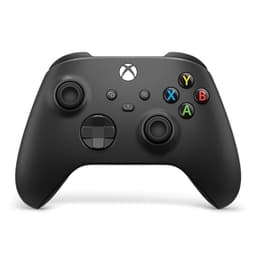
Xbox Wireless Controller
Xbox Wireless Controller
The official Xbox pad. Offset thumbsticks, AA batteries, a headphone socket on the bottom edge, and the default controller for Windows PC gaming.
Choose it if
- They own an Xbox Series X, Series S or Xbox One
- They play games on a Windows PC
- Their current pad has a big X in the middle
- You want a controller that also works on Android
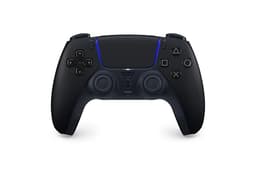
PlayStation DualSense
PlayStation DualSense Wireless Controller
The official PS5 pad. Symmetrical sticks, a built-in rechargeable battery, a touchpad, and haptics that respond differently game to game.
Choose it if
- They own a PlayStation 5
- Their current pad is white with a glowing light strip
- They'd notice and enjoy the advanced rumble effects
- You want a rechargeable pad with no batteries to buy
$74.99 · See it on AmazonPrice as of October 23, 2026. #ad How we’re funded
Side by side
| Xbox Wireless Controller | PlayStation DualSense | |
|---|---|---|
| Works with | Xbox Series X|S, Xbox One, Windows PC, Android | PlayStation 5 (and PC over USB) |
| Does NOT work with | PlayStation consoles | Xbox consoles |
| Power | Two AA batteries (rechargeable kit sold separately) | Built-in rechargeable battery |
| Thumbsticks | Offset — left stick sits higher | Symmetrical — both sticks level, at the bottom |
| Spot it by | Large X button in the center | Light strip around the touchpad; usually white |
| Headset | 3.5 mm socket on the bottom edge | 3.5 mm socket on the bottom edge |
| PC gaming | The de-facto standard; least setup | Works, but some games need extra configuration |
How to identify their console in thirty seconds
You almost never need to ask. Any of these will tell you:
- Look at the controller. Xbox: the two thumbsticks are at different heights, and there’s a big round X in the middle. PlayStation: the sticks are side by side at the bottom, the pad is usually white and black, and there’s a glowing strip around the flat touchpad in the center.
- Look at the box under the TV. An Xbox Series X is a tall black rectangle; a Series S is a small white box with a big circular vent. A PlayStation 5 is a large white two-paneled thing that’s hard to mistake for anything else.
- Listen to the vocabulary. Someone who mentions Game Pass, Halo or Forza has an Xbox. Someone who mentions PlayStation Plus, Spider-Man or God of War has a PlayStation.
- Look at a photo. If they’ve ever posted a picture of their setup, the answer is in it.
If you genuinely can’t find out
Don’t guess. A 50/50 bet on a gift is a bad bet, and the failure mode — them opening a box for a machine they don’t own — is a specifically deflating one.
Instead, buy something platform-neutral. A wired headset with a 3.5 mm plug works on both consoles, on a Switch and on a laptop. A light-up decoration, a board game or a collectible from a series they like needs no console at all. And an Amazon gift card is boring but functional. What you should not do is buy a store card for a specific platform, because that has exactly the same problem as the controller.
Is either one actually better?
They’re both excellent and the differences are matters of taste rather than quality, but for completeness:
The DualSense has the more impressive technology. Its triggers can stiffen and resist depending on what’s happening in the game, and its rumble is far more detailed than a simple buzz. In games built for it, this is genuinely remarkable and it’s the thing PS5 owners show off to visitors.
The Xbox pad is the more practical object. It’s the standard for PC gaming, so it needs the least setup on a computer; the AA batteries mean a flat controller is a thirty-second fix rather than a wait; and it’s comfortable in a reliable, unshowy way that people have liked for two decades.
Neither of those points should override the console question. A brilliant controller for a console they don’t own is worth nothing.
What about a Nintendo Switch household?
Neither of these works on a Switch. That console has its own controllers — the Pro Controller and Joy-Cons — and we compare those on their own page.
Our recommendation
Identify the console, buy the matching pad, and add a pack of AA batteries if it’s the Xbox one so it works the moment it’s unwrapped. If the console can’t be identified, buy a headset or a neutral gift and keep the controller idea for a birthday when you know more.
If the console in the house is not actually settled — or you are buying for somebody who plays on a Switch, a PC or a phone instead — our ranked list of the best gaming controller to give covers all six of the pads worth considering, sorted by the machine they plug into.
Frequently asked questions
Can you use an Xbox controller on a PS5?
No. Xbox and PlayStation controllers do not work on each other's consoles, and third-party adapters that claim otherwise are unreliable and not worth risking as a gift. Buy the pad that matches the console they own.
How can I tell which console someone has without asking?
Look at the controller if you've been in the room: an Xbox pad has thumbsticks at different heights and a large X in the middle, while a PlayStation DualSense is symmetrical, usually white, with a glowing strip around a flat touchpad. Their vocabulary also gives it away — Game Pass and Halo mean Xbox, PlayStation Plus and Spider-Man mean PlayStation.
Which controller is better, Xbox or DualSense?
Neither, in any way that should affect your purchase. The DualSense has more impressive technology in its triggers and rumble; the Xbox pad is the standard for PC gaming and its swappable AA batteries mean no downtime. Buy whichever matches their console — that decision outranks every other consideration.
What should I buy if I don't know which console they own?
Something platform-neutral: a wired headset with a 3.5 mm plug works on both consoles and a laptop, and decor, board games or collectibles need no console at all. Avoid platform gift cards for the same reason you're avoiding the controller — an Xbox card is no use to a PlayStation owner.
Do these controllers work on a Nintendo Switch?
No. The Switch uses its own controllers — Joy-Cons and the Switch Pro Controller. If they're a Switch household, our Pro Controller vs Joy-Cons comparison covers the right choice there.
Sources
- Amazon — Video Games store — Amazon's video-games storefront, where the games, gift cards and gear on this site are sold and priced (accessed July 22, 2026)
- Xbox — Game Pass — Microsoft's own Game Pass page: “Plans start at $9.99/month.” Four plans, each with its own price and contents — Essential, “then $9.99/month”, “50+ games playable on console, PC, & more devices”, “Cloud playtime (5 hours/month)”, online console multiplayer, “Earn Rewards points”; Premium, “then $14.99/month”, “200+ games”, “New XBOX-published games within 1yr of launch”, “Cloud playtime (10 hours/month)”, “Earn 2x Rewards points”; Ultimate, “$22.99/month”, “500+ games”, “New games on day one”, “EA Play, Fortnite Crew, & Ubisoft+ Classics”, “Cloud playtime (15 hours/month)”, “Earn 4x Rewards points”; and PC only, “$13.99/month”, “300+ games playable on PC only”, day one, EA Play, “Earn 2x Rewards points”. Day-one access is footnoted “Select games. Excludes Call of Duty titles.”, cloud gaming is “Not included with PC Game Pass”, Essential and Premium carry a “first 14 days for $1” promotional offer for which “Credit card required”, and the page states “Subscription continues automatically at the regular monthly price unless canceled through your Microsoft Account” (accessed October 3, 2026)
Keep browsing
Xbox Wireless Controller review
What a spare pad actually unlocks, and the AA battery question.
Read the review→Gifts for PlayStation gamers
The full shortlist for a PS5 household.
See PlayStation gifts→Gifts for Xbox gamers
The full shortlist for an Xbox household.
See Xbox gifts→The gamer gift checklist
Five questions that narrow any gamer down to the right gift.
Run the checklist→