Player Two Co

Switch 2 Pro Controller vs Switch Pro Controller: Which One to Give

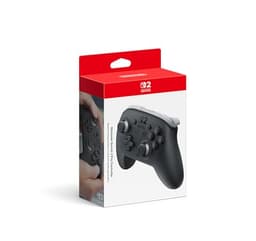
Two controllers that look almost identical in a product photo, with one rule between them that decides the gift: compatibility only runs one way.

By Stephen V.Last updated How we pick

The short answer: If they own a Nintendo Switch 2, give the Switch 2 Pro Controller — it adds a GameChat button, two programmable back buttons and a headphone jack. If they own an original Switch or Switch OLED, only the original Pro Controller will work: Nintendo says the Switch 2 version is only for use with Switch 2. And if you don't know which console they have, the original is the one that works on both.

The two Pro Controllers are the same shape, the same idea and a similar price, and on a shopping page they look like two versions of the same product. For playing on an already-matched console, the differences are modest. For giving one as a present, one difference matters more than everything else put together.

Nintendo states it plainly in two places. Asked whether the Switch 2 Pro Controller works with the original Switch, Nintendo’s own FAQ answers: “No. The Nintendo Switch 2 Pro Controller is only for use with Nintendo Switch 2.” Its compatibility table lists the original Pro Controller the other way round: compatible, paired wirelessly to a Switch 2. Everything else on this page is detail.

How this is funded: Player Two Co earns a commission if you buy through our links, at no extra cost to you. It never changes which gift we recommend, and we’ll tell you when we’d skip one. Full disclosure.

Choose in ten seconds

  • Nintendo Switch 2 Pro Controller

    Switch 2 Pro Controller

    Nintendo Switch 2 Pro Controller

    The new full-size pad made for the Switch 2, with a C Button for GameChat, GL/GR buttons on the back you can map to anything, and a 3.5 mm headphone jack on the controller itself.

    Choose it if

    • They definitely own a Nintendo Switch 2
    • They use GameChat or play online with friends
    • They'd plug a wired headset into the controller
    • They play for long sessions on the TV
    $89.00 · See it on Amazon

    Price as of September 20, 2026. #ad How we’re funded

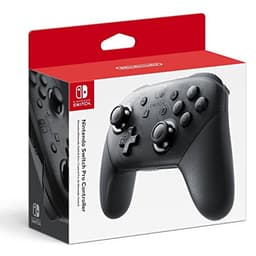
  • Nintendo Switch Pro Controller

    Switch Pro Controller

    Nintendo Switch Pro Controller

    The original full-size Switch pad. Nintendo lists it as compatible with the Switch 2 when paired wirelessly, so it's the one Pro Controller that works on both generations.

    Choose it if

    • They own an original Switch or Switch OLED
    • You aren't certain which Switch they have
    • They might upgrade to a Switch 2 later
    • They don't need a headphone jack on the pad
    $55.97 · See it on Amazon

    $79.9930% off

    Price as of September 20, 2026. #ad How we’re funded

Side by side

 Switch 2 Pro ControllerSwitch Pro Controller
Works withNintendo Switch 2 onlySwitch and Switch OLED — and Switch 2, paired wirelessly
GameChat buttonYes — the C ButtonNot among Nintendo's listed features
Programmable back buttonsYes — GL and GR, mappable to any buttonNot among Nintendo's listed features
Headphone jackYes — 3.5 mm on the controllerNot among Nintendo's listed features
RumbleHD Rumble 2HD Rumble
Motion controlsYesYes
amiibo readerBuilt inBuilt in
Battery (Nintendo's figure)About 40 hoursAbout 40 hours
Full chargeAbout 3 hoursAbout 6 hours

The picks at a glance

Ranked for who they suit and how safe a gift they are. Tap a row to jump to the full write-up. We haven’t hands-on-tested these — here’s exactly what we do instead.

#GiftBest forPrice
1
Nintendo Switch 2 Pro Controller

Nintendo Switch 2 Pro Controller

The full-size pad that makes a Switch 2 feel like a proper TV console. Nintendo's own listing gives it a C Button for GameChat, GL/GR buttons on the back you can map to anything, and a headphone jack on the bottom — the last of which quietly solves the headset question too.

Best for a Switch 2
$89.00 · See it on Amazon

Price as of September 20, 2026. #ad How we’re funded

2
Nintendo Switch Pro Controller

Nintendo Switch Pro Controller

A big upgrade over the little Joy-Cons for any serious Switch player — more comfortable, longer battery, and the pad they'll reach for every time. A treat gift that lands.

Best for an original Switch
$55.97 · See it on Amazon

$79.9930% off

Price as of September 20, 2026. #ad How we’re funded

3
8BitDo SN30 Pro

8BitDo SN30 Pro

A retro-styled, do-everything controller that works with the Switch, PC, phones and Steam Deck. It's the charming, affordable pick for a gamer with a soft spot for the classics.

Best budget pad for Switch and PC
$38.99 · See it on Amazon

$44.9913% off

Price as of September 20, 2026. #ad How we’re funded

4
Nintendo Joy-Con 2 Charging Grip

Nintendo Joy-Con 2 Charging Grip

Nintendo describes this one exactly right: attach the Joy-Con 2 controllers to it to use as a classic-style controller, or as a handy charging station. It is the cheap fix for the household whose spare controllers are always flat when someone wants to play.

Best budget Switch 2 upgrade
$39.88 · See it on Amazon

Price as of September 20, 2026. #ad How we’re funded

If neither one fits

Two alternatives worth knowing. A smaller third-party pad that 8BitDo lists for the Switch, the Switch 2 and Windows, for someone who plays on more than one — and, for a Switch 2 owner on a tighter budget, the grip that turns the Joy-Con 2 they already own into one classic-shaped controller.

#3Best budget pad for Switch and PC

8BitDo SN30 Pro

A retro-styled, do-everything controller that works with the Switch, PC, phones and Steam Deck. It's the charming, affordable pick for a gamer with a soft spot for the classics.

Great because

  • Nostalgic SNES look, modern internals
  • Works across Switch, PC, Android and Steam Deck
  • Great value

Keep in mind

  • The compact retro shape suits smaller hands better
Platform
Retro
Type
Gear
Works with
Switch, PC, Android, Steam Deck
Good for
All ages

Skip it if: Skip if they want a full-size, ergonomic modern pad.

Details read from the product listing on July 22, 2026. Price is live from Amazon.

#4Best budget Switch 2 upgrade

Nintendo Joy-Con 2 Charging Grip

Nintendo describes this one exactly right: attach the Joy-Con 2 controllers to it to use as a classic-style controller, or as a handy charging station. It is the cheap fix for the household whose spare controllers are always flat when someone wants to play.

Great because

  • Charges the small controllers instead of leaving them to drain on a shelf
  • Turns two Joy-Con 2 into one classic-shaped pad for playing on the TV
  • Nintendo includes the USB-C charging cable in the box

Keep in mind

  • Only useful if they own Joy-Con 2 controllers to put in it
  • Still smaller in adult hands than a full-size Pro Controller
Platform
Nintendo Switch 2
Type
Accessory
Works with
Joy-Con 2 controllers on Nintendo Switch 2
Good for
All ages

Skip it if: Skip if they only ever play in handheld mode, where the controllers charge on the console anyway.

Details read from the product listing on September 15, 2026. Price is live from Amazon.

The rule that decides it: compatibility runs one way

A Switch 2 accepts the original Pro Controller. An original Switch does not accept the Switch 2 Pro Controller. That single asymmetry produces three simple cases.

  • They have a Switch 2. Either controller works, and the Switch 2 version is the better gift because it was made for that console’s features.
  • They have an original Switch or a Switch OLED. Only the original Pro Controller works. The newer one would be a very well-made paperweight.
  • You don’t know. Buy the original. It works on both, and if they upgrade to a Switch 2 next year it comes with them. Nintendo also notes the original pad can be charged from the Switch 2 dock over a USB cable.

If you can see the console, the Switch 2 is the larger one whose controllers attach to the sides by magnet rather than sliding down a rail. Our Switch 2 games guide has more on telling the models apart.

What the Switch 2 version adds

Three additions, all listed by Nintendo, and each worth more to some people than others.

A C Button for GameChat. GameChat is the Switch 2’s built-in voice and video chat, opened with the C Button. With the Pro Controller they can open it without reaching for the console. Nintendo notes that online features, GameChat included, need a Nintendo Switch Online membership — so this matters most to someone who already plays with friends online.

GL and GR buttons on the back. Two extra buttons under the fingers that can be set to copy any other button. A casual player may never touch them; for someone who plays fast action games, having a button under a spare finger is the kind of upgrade they’d notice.

A 3.5 mm headphone jack. A wired headset plugs straight into the controller, so they can sit back on the sofa with audio in their ears and no cable running across the room to the console. If a headset is part of your gift plan, our headset compatibility guide explains which kinds work where.

What stays the same

Both are full-size controllers with motion controls, rumble and a built-in amiibo reader, and Nintendo gives both a battery life of about 40 hours. The one practical difference in daily use is charging: Nintendo puts a full charge at about three hours for the Switch 2 pad and about six for the original.

Is a Pro Controller the right gift at all?

It’s the right gift for one person who plays on the TV. A Pro Controller gives one player a more comfortable seat than the small Joy-Con that come with the console. It does nothing for someone who plays in handheld mode, where the controls are part of the console.

If the real goal is letting more people play at once, a Pro Controller adds one player where a pair of Joy-Con adds two — our Pro Controller vs Joy-Con comparison sets that choice out. And if they already have a Pro Controller, don’t buy a second one for the same person; a game or an accessory from our Switch 2 list will be used more.

One thing to check before you buy

Big marketplaces list controllers from many sellers, not only from Nintendo, and the asking price can drift well away from Nintendo’s own. The buy buttons on this page point at the Amazon listings we track a live, dated price for; if the number looks unusually low or high on the day, compare it against Nintendo’s own store and check who is actually selling the one in your basket before you order.
Frequently asked questions

Does the Switch 2 Pro Controller work on the original Nintendo Switch?

No. Nintendo's own FAQ answers the question directly: "No. The Nintendo Switch 2 Pro Controller is only for use with Nintendo Switch 2." If they have an original Switch or Switch OLED, buy the original Pro Controller.

Does the original Switch Pro Controller work on the Switch 2?

Yes. Nintendo's compatibility table lists it as compatible when paired wirelessly to a Switch 2, and says it can be charged by connecting it to the Switch 2 dock with a USB cable. That makes it the safe choice when you don't know which Switch they have.

What's the difference between the two Pro Controllers?

The Switch 2 Pro Controller adds a C Button for GameChat, two GL/GR back buttons you can map to any other button, a 3.5 mm headphone jack and HD Rumble 2. Both have motion controls and a built-in amiibo reader, and Nintendo gives both about 40 hours of battery. The newer one charges in about three hours; the original takes about six.

Can you plug headphones into the Switch 2 Pro Controller?

Yes. Nintendo lists a 3.5 mm audio jack on the controller (a 4-pole stereo mini plug), so a wired headset or headphones plug straight in. A headphone jack isn't among the features Nintendo lists for the original Pro Controller.

Is a Pro Controller worth it as a gift?

For someone who plays on the TV for long sessions, yes — it's a noticeably more comfortable way to play than the small Joy-Con. It's wasted on someone who plays in handheld mode, and it only adds one player, so if you want more people playing at once, a pair of Joy-Con is the better buy.

I don't know which Switch they have. What should I buy?

The original Switch Pro Controller, because Nintendo lists it as working on both the original Switch and the Switch 2. If you'd rather avoid the question entirely, a Nintendo eShop card works on every Switch model and can't be the wrong one.

Sources

  • Nintendo Support — Nintendo Switch 2 Pro Controller FAQNintendo's own FAQ for the pad: it “includes a C Button for opening the GameChat menu at any time”, “GL/GR Buttons that you can freely map to any button you choose” and “an audio jack for headphones and headsets”; a full charge takes approximately 3 hours; and, asked whether it works with the original console, Nintendo answers “No. The Nintendo Switch 2 Pro Controller is only for use with Nintendo Switch 2” (accessed September 15, 2026)
  • Nintendo Store — Nintendo Switch 2 Pro ControllerNintendo's own listing: HD Rumble 2, motion controls, built-in amiibo functionality, an “audio jack – 4 pole stereo 3.5mm mini plug”, and “only for use with the Nintendo Switch 2 system” (accessed September 18, 2026)
  • Nintendo UK — Nintendo Switch 2 accessoriesNintendo's own accessories page, which gives the Nintendo Switch 2 Pro Controller's battery life as “approx. 40 hours” with a charge of about 3 hours (accessed September 18, 2026)
  • Nintendo Support — Compatibility of Nintendo Switch with Nintendo Switch 2Nintendo's own compatibility table: the original Nintendo Switch Pro Controller is “Compatible — Can be used by pairing wirelessly to Nintendo Switch 2” and can be charged from the Switch 2 dock over USB; “The Nintendo Switch dock is not compatible with Nintendo Switch 2”; and “some Nintendo Switch games may not be supported on or fully compatible with Nintendo Switch 2” (accessed September 18, 2026)
  • Nintendo Support — Nintendo Switch Pro Controller FAQNintendo's own FAQ for the original Pro Controller: the battery “can last approximately 40 hours”, and a full charge takes “approximately 6 hours” (accessed September 18, 2026)
  • Nintendo Store — Pro Controller for Nintendo SwitchNintendo's own listing for the original Pro Controller: “motion controls, HD rumble, built-in amiibo™ functionality, and more” (accessed September 18, 2026)
  • Nintendo — Nintendo Switch 2: System Features and Play ModesNintendo's own features page: the system “comes with 256 GB of internal storage—8x the capacity of Nintendo Switch” and a 7.9-inch 1080p LCD screen “featuring support for HDR, VRR, and up to 120 fps in compatible games”; “strong magnets keep the controllers firmly attached to the system”; pressing “the C Button on the right Joy-Con 2 controller” starts an online chat where you can voice chat, share your screen and video chat; to video chat you “connect a compatible USB-C camera, like the Nintendo Switch 2 camera (sold separately)”; and “internet, Nintendo Switch Online membership and Nintendo Account required for online features, including GameChat” (accessed September 15, 2026)
  • 8BitDo — SN30 Pro Bluetooth Gamepad8BitDo's own product page: compatible with Switch (3.0.0 and above), Switch 2 (20.1.1 and above), SteamOS, Windows 10 (1903) and above, Android 9.0 and above, Apple iOS and macOS; connects by Bluetooth or USB-C (accessed September 18, 2026)

Keep browsing